

Introduction: Closing the Feedback Loop Between AI and MATLAB
If you’ve ever used an LLM to generate MATLAB code, you’ve probably experienced the same workflow: you ask a question in a chat tool, copy the code into MATLAB, run it, hit an error, copy the error back into the chat, and repeat.
It works - but it’s clunky. More importantly, it breaks the tight feedback loop engineers rely on when iterating quickly.
We explored this problem (and its solution) in depth during a recent technical deep dive with MathWorks, where we walked through how agentic AI workflows are beginning to change the way engineers interact with MATLAB. The core idea is simple but powerful: instead of treating AI as a code suggestion engine, let it act as an agent that can write code, run it, observe the results, fix errors, and iterate - directly against a live MATLAB session.
This is exactly the gap that agentic AI workflows are starting to close. With the introduction of the Model Context Protocol (MCP) and the release of the MATLAB MCP Core Server, MATLAB can now be driven directly by AI agents that don’t just generate code, but actively execute, debug, and refine it.
In this post, we’ll break down what that actually means in practice, why MCP matters for engineering workflows, and how MATLAB fits into the emerging agentic AI ecosystem, drawing on both the MathWorks releases and what we learned hands-on during the deep dive.
Agentic AI with MATLAB: Real Coding Workflows Using MCP Servers | Yann Debray - Deep Dive
From “Code Suggestions” to Agentic Workflows
Traditional AI coding assistants are largely passive. They generate snippets, but they don’t verify whether those snippets actually work in your environment.
Agentic AI changes that model.
An agentic workflow is one where an AI system can:
- Understand your goal
- Decide which tools to use
- Take actions (like running code or creating files)
- Observe the results
- Recover from errors
- Iterate until the task is complete
This is a big shift. Instead of acting as a smarter autocomplete, the AI becomes a loop-closing system, closer to a junior collaborator than a static assistant.
For engineers familiar with MATLAB’s existing AI tooling, it’s worth clarifying how this fits into the broader MathWorks ecosystem. MATLAB Copilot is deeply integrated into the MATLAB environment and excels when you want AI assistance without leaving MATLAB itself - especially for inline help, code explanations, and iterative development within a single session.
MCP-based workflows, by contrast, shine when MATLAB needs to participate in broader, multi-tool agentic systems. This includes IDE-based development (like Visual Studio Code), automated pipelines, or workflows where an AI agent coordinates across files, tests, version control, and execution environments.
These approaches are complementary, not competing. Copilot optimizes the experience inside MATLAB, while MCP enables MATLAB to act as a tool within larger agentic workflows.
Why the Model Context Protocol (MCP) Exists
As agentic AI took off, a practical problem emerged: There are many AI clients (Claude, VS Code agents, Gemini CLI, etc.) and many tools engineers want to connect (IDEs, file systems, GitHub, simulation software). Building custom integrations for every combination doesn’t scale.
Model Context Protocol (MCP) solves this by standardizing how AI clients discover and invoke tools via a client–server architecture. If you’ve heard it described as “USB-C for AI,” that’s a useful mental model.
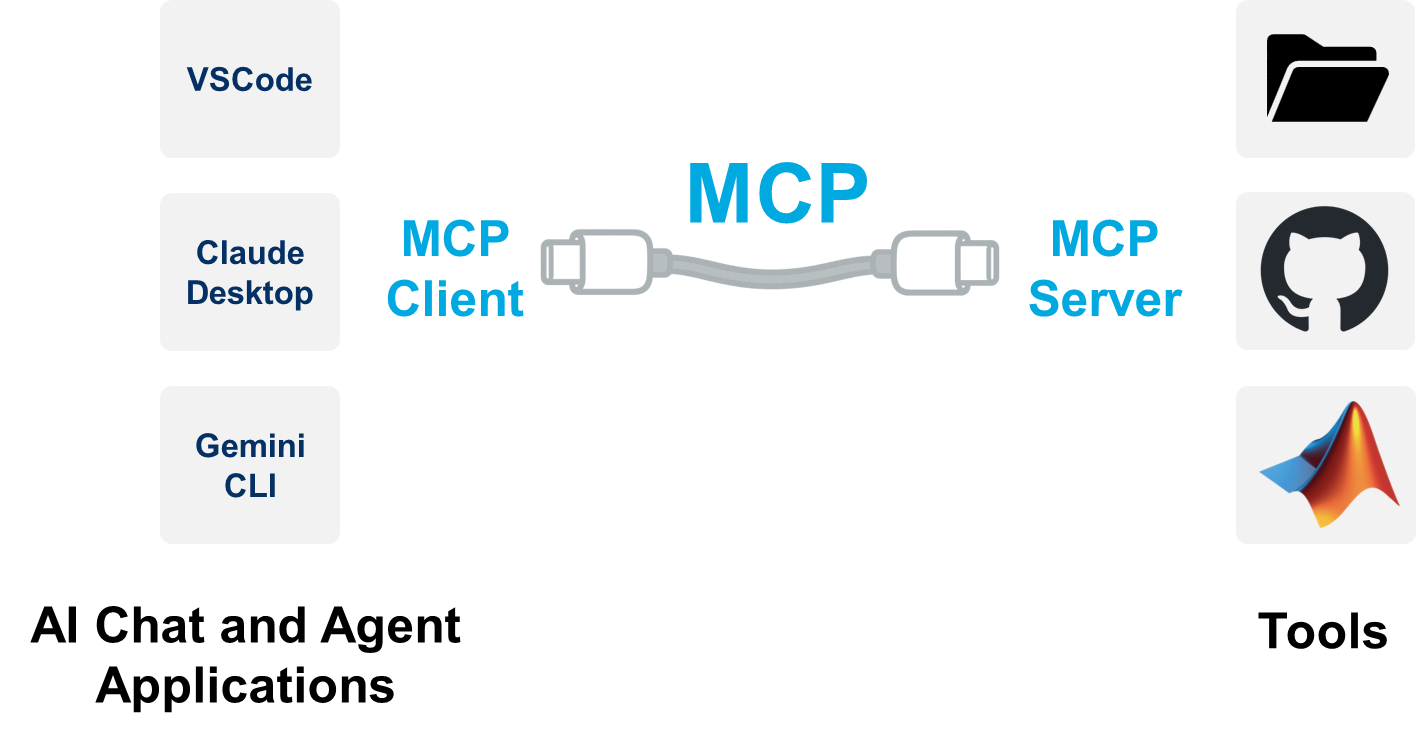
Instead of hard-wiring every integration, tools expose themselves as MCP servers. AI clients connect to those servers, understand what actions are available, and decide when to use them.
What the MATLAB MCP Core Server Enables
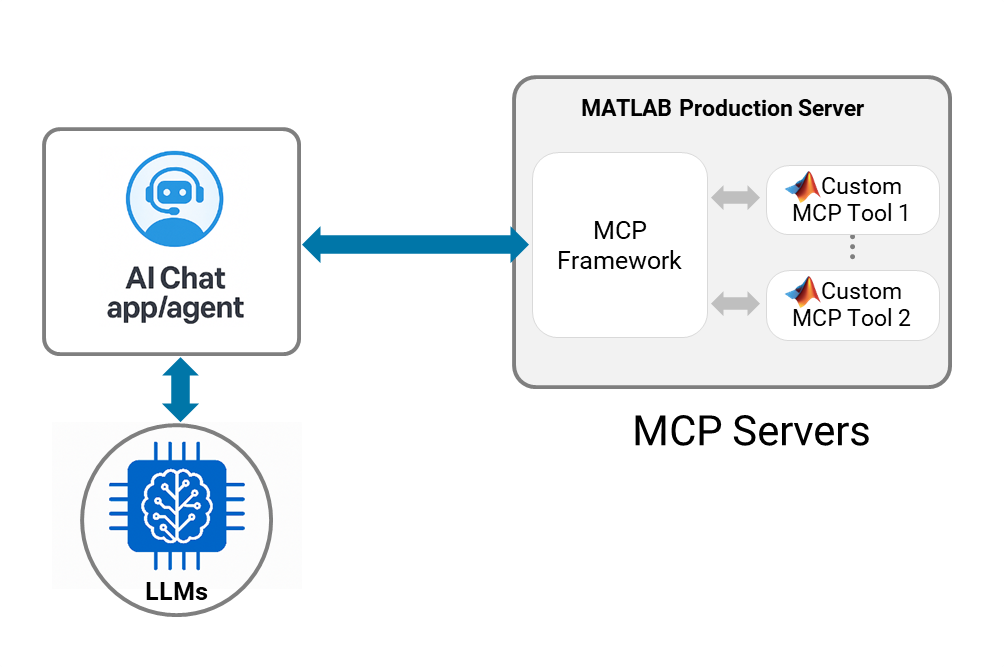
MathWorks released the MATLAB MCP Core Server to make MATLAB a first-class participant in agentic AI workflows, rather than a downstream execution target. Conceptually, it acts as a bridge between AI agents and a live MATLAB environment (local or remote) using a standardized protocol.
Instead of treating MATLAB as “just a language the AI knows,” the MCP Core Server exposes MATLAB as a tool the agent can reason about and operate.
At a high level, the server provides a focused set of capabilities, including:
- Detecting which MATLAB toolboxes are installed and available
- Checking MATLAB code for issues before execution
- Evaluating MATLAB expressions interactively
- Running .m files programmatically
- Running MATLAB test files and returning results
These capabilities are intentionally granular. They allow an agent to make informed decisions - Can this code run here? Should I fix something first? Did the test pass? - instead of blindly generating code and hoping for the best.
From the agent’s perspective, MATLAB becomes:
- An executable environment
- A source of structured feedback
- A system it can query, test, and iterate against
That distinction matters because it’s what enables AI systems to move from writing MATLAB code to working with MATLAB as part of a broader engineering workflow, alongside IDEs, file systems, version control, and documentation tools.
What an Agentic MATLAB Workflow Looks Like
In a traditional setup, you might ask an AI to “create a linear regression in MATLAB,” then manually move the generated code into MATLAB, run it, inspect the output, and debug any errors yourself. Each step breaks the flow and shifts responsibility back to you.
With MCP in place, the workflow changes fundamentally.
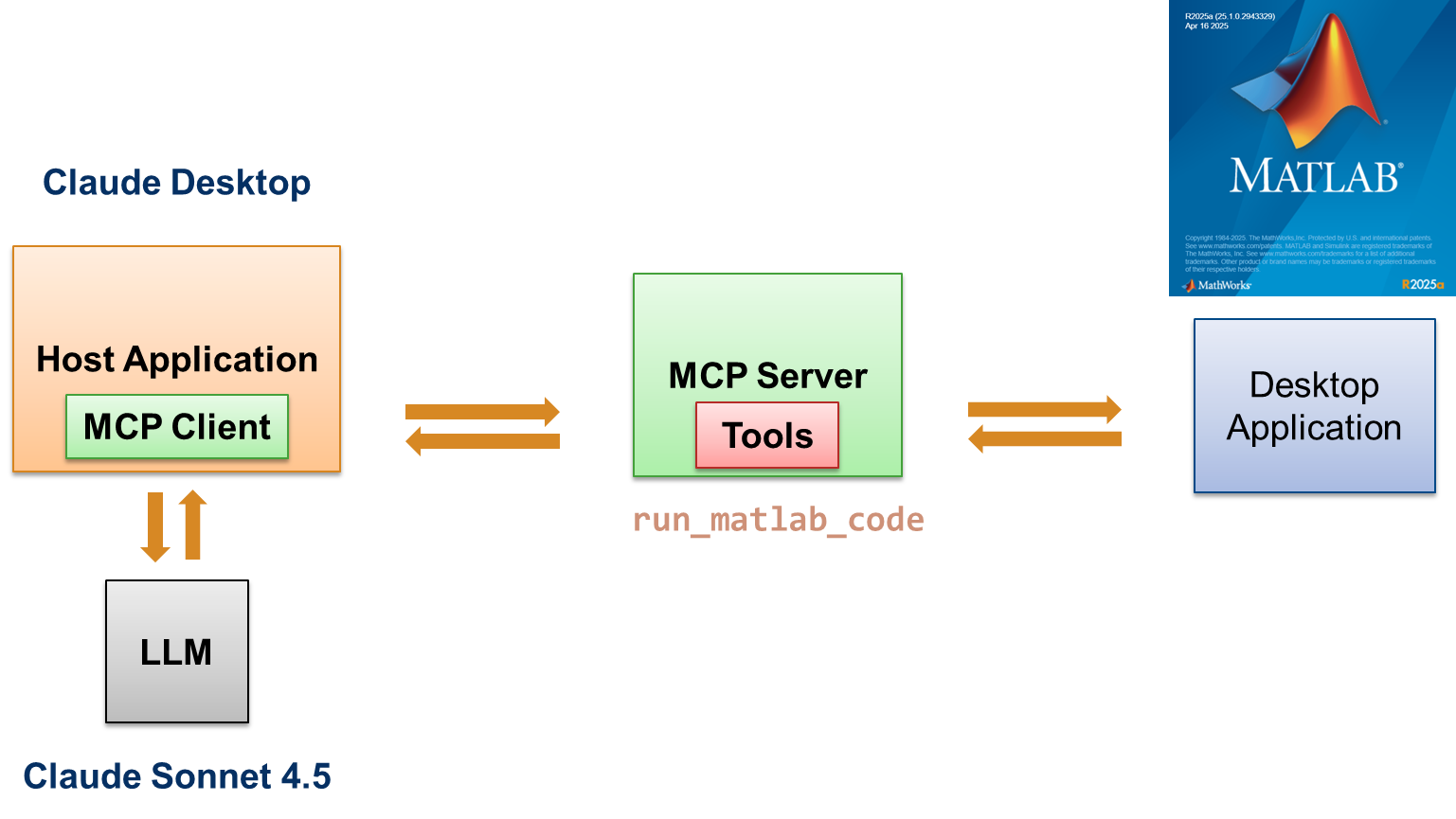
Instead of just generating text, the AI operates inside an execution-aware loop:
- You prompt an MCP-enabled AI client (such as Claude Desktop or Visual Studio Code in Agent Mode)
- The client exposes available MCP tools to the model, including the MATLAB MCP Core Server
- The model decides when to invoke MATLAB tools (for example, to check code, run a file, or execute tests)
- MATLAB runs the code in a real session, using the actual toolboxes and environment available
- Outputs, plots, warnings, and errors are returned directly to the agent
- If something fails, the agent can modify the code and rerun it automatically
This mirrors what we demonstrated in the deep dive: the agent doesn’t assume the code works - it verifies it. Execution, inspection, and iteration all happen as part of the same feedback loop.
The shift may look subtle, but it’s important. Code generation and code execution are no longer separate phases. They’re tightly coupled, which is exactly how engineers already think when they work interactively in MATLAB. MCP simply allows an AI agent to participate in that same loop.
Where Agentic AI Starts to Matter for Engineers
Rather than talking about agentic AI in the abstract, we put it to the test in a joint deep dive with MathWorks. Working through real MATLAB workflows revealed a few consistent patterns.
1. Error recovery becomes automatic
When generated MATLAB code failed - whether due to layout issues in an app or incorrect assumptions - the agent was able to observe the error, modify the file, and rerun it without manual intervention.
That alone removes a huge amount of friction from early-stage prototyping.
2. UI and app generation are natural fits
One of the strongest use cases we saw was MATLAB app generation. Creating GUIs is often tedious, even for experienced users. Delegating that scaffolding to an agent lets engineers focus on algorithms and models instead of layout code.
3. This works best inside real development environments
Chat interfaces are great for quick demos, but IDE-based agent workflows (like in Visual Studio Code) feel much closer to “real” development. You get project context, files, tests, and version control - while still benefiting from agentic behavior.
4. It scales beyond toy examples
We moved from simple regressions to PDE-based thermal simulations and interactive apps. The value compounds as the task complexity increases, because iteration costs drop dramatically.
Once you see this workflow end-to-end, it becomes clear that agentic AI isn’t about automating single steps, but about compressing entire feedback loops.
Conclusion: From Code Generation to Execution-Aware AI
Agentic AI workflows don’t replace engineering judgment - they amplify it. Their real impact is in compressing the distance between an idea and a working experiment.
The breakthrough isn’t that an AI can generate MATLAB code. It’s that, once connected through MCP, the AI can do the work that normally slows engineers down:it can run code, observe failures, fix issues, package results, and even help document outcomes, all as part of a single feedback loop.
That shift changes how iteration feels. Instead of bouncing between tools and manually stitching steps together, engineers stay focused on the problem they’re solving while the agent handles the mechanics of execution and iteration.
If you’re already using MATLAB and beginning to explore AI-assisted development, MCP-based workflows represent a practical next step. They move AI from being a passive helper that suggests code to an active participant in building, testing, and refining real engineering systems.
In short, this isn’t about faster typing, but about building things faster, with tighter feedback and fewer interruptions.
—-------
Want to dive deeper?
- Read MathWorks’ announcement of the MATLAB MCP Core Server on GitHub to understand the architecture and tooling in detail: https://blogs.mathworks.com/deep-learning/2025/11/03/releasing-the-matlab-mcp-core-server-on-github/
- Read MathWorks’ hands-on post on MATLAB Code Generation with the Help of an MCP Server: https://blogs.mathworks.com/community/2025/06/17/matlab-code-generation-with-the-help-of-an-mcp-server/
- Watch our technical deep dive with MathWorks, where we walk through real agentic workflows - from code execution to app generation and simulation: https://youtu.be/ktvPriE5WEE
